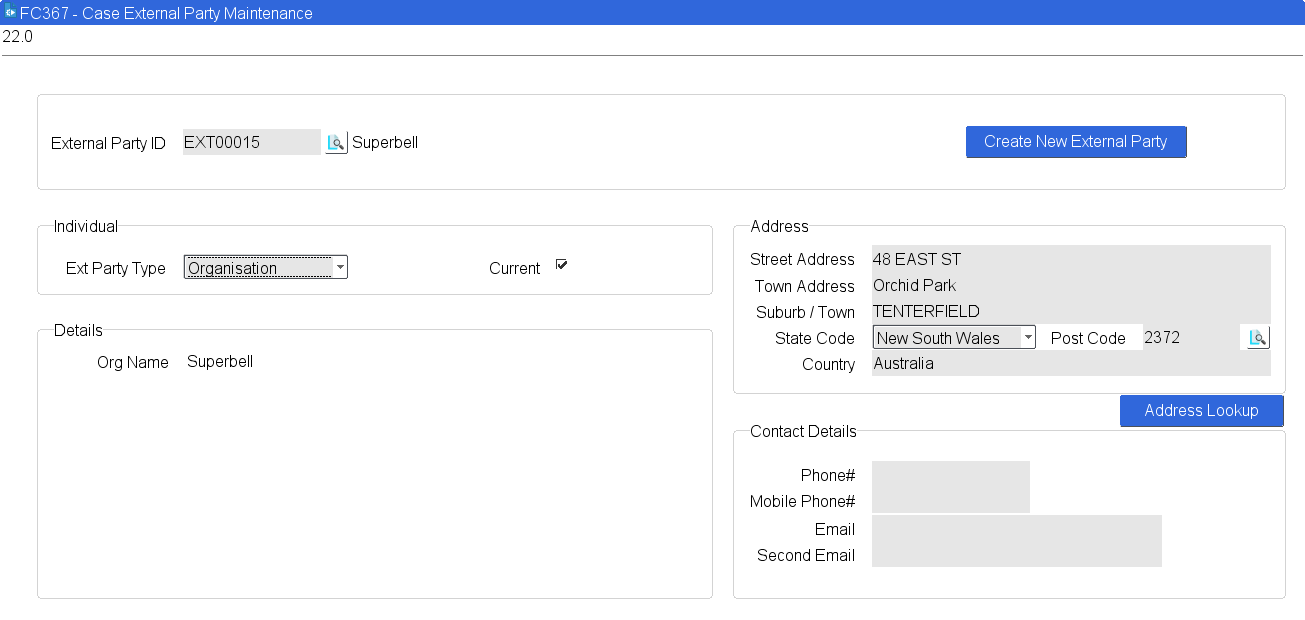
Case External Party Maintenance
The FC367 screen allows a user to create and maintain information about external parties to the organisation that may be involved in a case.
Note: The Address Lookup button is only available to Hosted clients.
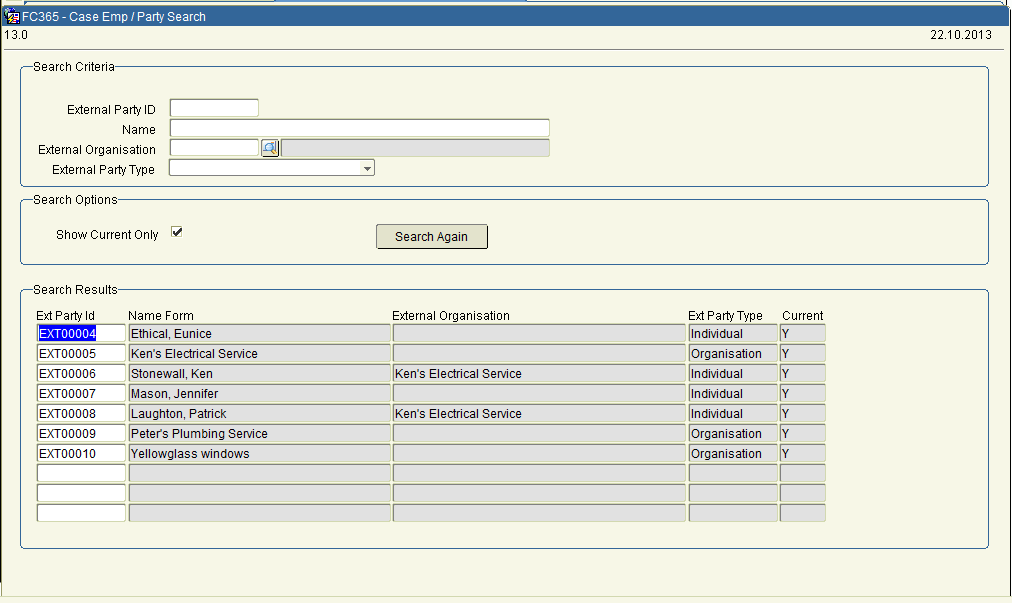
If a user searches for an External Party, the following screen will appear, and an ‘External Party ID’ can be selected.
A user can create a new external party by clicking on the ‘Create New External Party’ button. This will automatically generate a new External Party ID once the record has been completed and saved.
There are 2 types of external parties - Individuals and Organisations. An individual can belong to an external party organisation (i.e. the organisation the individual works for).
 Please Note: The Organisation record should be created before the Individuals for the organisation are configured.
External Party ID The unique ID of the External Party. This field is automatically populated for
new external parties.
Individual
Ext Party Type Select Individual or Organisation.
Please note: If Organisation is selected the form will display without Surname, First name, etc. fields.
Current Tick for ‘Yes’ or untick for ‘No’.
The following fields will display if the Ext Party Type is ‘Individual’:
Surname Enter the surname of the employee.
This is a free text field and is 50 characters in length.
Mandatory Field
First Name Enter the first name of the External Party.
This is a free text field and is 50 characters in length.
Mandatory Field
Preferred Name The preferred name of the individual.
Initials Dynamically displays the initials of the first name entered in the naming field.
Gender The Gender of the individual.
Business Title The Business Title of the individual.
Ext Org The External Organisation of the individual.
A query will invoke FC365 - Case Emp/Party Search.
Override Address If the ‘Ext Org’ field is populated then the Address section of the form is pre-populated with the organisation address details (from the External Party record for the Organisation). To override this address with a different address for the individual, this box should be checked and the address section will no longer be greyed out or pre-populated.
The following fields will display if the Ext Party Type is ‘Organisation’:
Org Name The name of the organisation.
This is a free text field and is 100 characters in length.
Street Address The Street address for the ‘Individual’ or ‘Organisation’.
Town Address The Town address for the ‘Individual’ or ‘Organisation’.
Suburb/Town The Suburb or Town for the ‘Individual’ or ‘Organisation’.
State Code The State, Region or Province for the Individual or Organisation.
Post Code The post code for the ‘Individual’ or ‘Organisation’.
Country The Country for the Individual or Organisation.
Phone# The external party’s phone number. This is a free text field and is 20 characters in length.
Mobile# The external party’s mobile phone number. This is a free text field and is 20 characters in length.
Email The email address for the external party.
Second Email An alternative email address for the external party.
Email addresses can only contain alpha-numeric characters or any of the following characters "+", "-"(hyphen), "." (full stop), "_"(underscore), "^", “ ‘ “ ,"~", "@". In the domain part of the email address, only the following characters are allowed: alpha-numeric, "-"(hyphen), "." (full stop) and “ ‘ “ (apostrophe). Email addresses must have the character "@" as a separator between the local and the domain part of an email address. The domain part of the email address must have at least one occurrence of "." (full stop).
If the user enters an email address that contains any other characters then it is an invalid email address and an error message will appear.